


Optimizely released CMS 13 in March 2026, and new CMS features now go into CMS 13 only. Getting there is a proper upgrade. Your content stays where it is, but the code around it changes, and on the sites we’ve trial-upgraded so far the first build threw up somewhere between 200 and 300 errors. That’s normal for a major version. It’s also why we find them before we quote.
What changes in CMS 13
How big your upgrade is depends on which of these apply to you.
.NET 10 comes first
CMS 13 needs .NET 10, and Microsoft only supports .NET 8 and 9 until 10 November 2026. CMS 12 runs on .NET 10 too, so you can make that move now and carry the work straight into your upgrade.
Search moves to Optimizely Graph
Search & Navigation (Find) doesn’t run on CMS 13, so search, listings and filters built on it move to Optimizely Graph. Sites already on Graph still need their queries updated, because the schema changes in CMS 13.
Editors sign in with Opti ID
On Optimizely’s DXP cloud, CMS 13 editors log in through Opti ID, so your single sign-on needs setting up there. It’s worth starting early, because IT approvals take time. Visitor logins on your website don’t change.
Every add-on gets checked
Third-party packages need CMS 13 versions, and some haven’t made the jump yet. Advanced Reviews, which lets people outside the CMS review drafts, is one. We check every package and find an update, a replacement or a way to live without it.
Visual Builder arrives
Visual Builder lets editors build pages from sections and reusable blueprints, with a live preview. It’s optional, and your existing pages keep working as they are.
Agents can edit content
Optimizely’s Agent Platform (formerly Opal) can create and edit content in CMS 13, which it can’t do on CMS 12. You decide when, and whether, to switch it on.
Start with a trial upgrade
We upgrade a copy of your site to .NET 10 and CMS 13 in our own environment and log everything that breaks. It takes two to five days. You get a findings report and an itemised estimate, and you decide what happens next.
Book a trial upgrade

How we get you to CMS 13
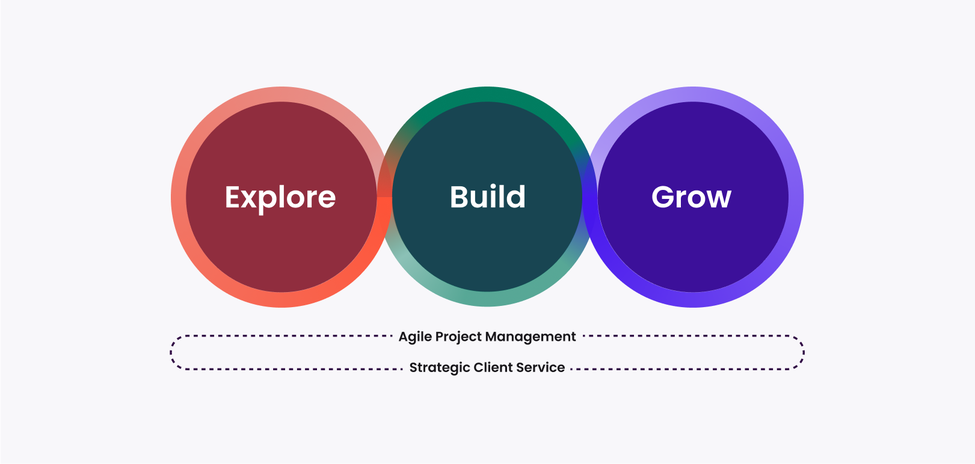
Upgrades follow our Explore, Build, Grow framework. Explore finds out what your site needs, Build gets you onto CMS 13, and Grow puts the new features to work once you’re safely live.
Explore
Find out what breaks
We run the upgrade on a copy of your site and record every build error, broken API and incompatible add-on before anyone writes a quote. Every trial goes into a shared record of what CMS 13 throws at real sites. Yours starts with what the last one taught us.
You’ll come away with:
- a findings report on every build and API error
- an audit of your add-ons and packages
- a check of your search and Optimizely Graph queries
- a list of what your IT, identity and security teams need to line up, and
- an itemised estimate and timeline.


Build
Get onto CMS 13 safely
We fix what the trial found, move your search to Graph, connect Opti ID and run full regression testing. Then we take you live with little or no downtime, and give you priority support straight after.
You’ll come away with:
- .NET 10 and CMS 13 in every environment
- search running on Optimizely Graph
- Opti ID connected to your single sign-on
- regression, SEO and analytics checks, and
- security scan reports for your change process.


Grow
Put CMS 13 to work
Once you’re live, we bring in the new features at a pace your team can absorb. There’s no need to take on everything at once (or at all, if a feature doesn’t earn its keep).
Typical next steps include:
- Visual Builder for new campaign and landing pages
- editor training and reusable blueprints
- moving media into the built-in DAM
- Agent Platform workflows that fit your governance, and
- generative engine optimisation (GEO) for AI search.


“Clients who select Luminary for an Optimizely project can be confident they are in safe hands, with Luminary being among the first in APAC to test and provide feedback on new product features. Their technical proficiency, combined with a disciplined approach to delivery, ensures reliable results for even the most demanding enterprise requirements.
Meet the upgrade team
These are the people who plan and run CMS 13 upgrades for our clients.

Tony Duan
Technical Director
Tony is a certified CMS developer across Kentico Xperience and Optimizely, with a strong mastery of complex integrations.

Fithratur Rahman
Senior Developer
Rahman is a .NET Developer that specialises in Optimizely CMS.

Nattawut Comlon
Senior Developer
Nattawut is an experienced and meticulous developer, uniquely skilled in navigating complex projects.

Hadi Wijaya
Senior Developer
Hadi is an experienced developer who specialises in Kentico Xperience and Optimizely.

Jono Pedreira
Senior Digital Producer
Having leveraged over a decade of expertise in business analysis and digital project delivery, Jono has always been able to bridge the gap between technical teams and business stakeholders.

Liam Thomas
Engagement Director
Liam leads the Client Service team and is ultimately responsible for the quality of our client relationships.
Questions about CMS 13 upgrades
Do we have to upgrade now?
Optimizely isn’t forcing anyone off CMS 12 yet. It still fixes bugs and security issues in CMS 12, but new features now go into CMS 13 only, and CMS 12 drops out of maintenance once CMS 14 arrives. The firmer date is Microsoft’s. It only supports .NET 8 and 9 until 10 November 2026, so if your site still runs on either, that’s the place to start.
Will our site go down during the upgrade?
On Optimizely’s DXP cloud, the upgrade happens in place using deployment slots. We check CMS 13 in the slot while your current site keeps serving visitors, then swap it in with little or no downtime. Until the swap you can cancel and stay on CMS 12, and we take a fresh backup before go-live so there’s a way back after it too.
What happens to our site search?
If it runs on Search & Navigation (Find), we rebuild it on Optimizely Graph. Graph’s .NET SDK covers the common Find patterns, so simple search usually ports across without much drama. Custom scoring, boosting and complex facets take more work. Your visitors should get the same search, unless you’d like to improve it while we’re in there.
Do we have to use Visual Builder?
No. Your existing pages and blocks keep working, and so does your MVC and Razor code. Visual Builder needs your components set up for it, so we suggest starting with new campaign and landing pages after go-live, then moving templates across as they come up for a refresh.
Will AI features switch themselves on?
CMS 13 includes some built-in AI features, and the full Agent Platform is licensed separately. Both can stay switched off until your governance group is happy, and we’ll confirm exactly what’s on before go-live.
How long does it take, and what does it cost?
The trial upgrade takes two to five days. Allow two to four months for the upgrade itself, depending on your search, your add-ons and how quickly your team can test. Cost depends on the same things, which is why we price from what the trial finds.
Can we go straight from CMS 11?
Yes, though you’ll pass through CMS 12 on the way. Going from CMS 11 to 12 is the bigger of the two jumps, because it moves your site from .NET Framework to modern .NET. We’ve taken clients through it before, and we’d plan both steps as one program.
More on CMS 13
Read what’s new for marketers, how Optimizely’s AI is changing, and how we protect your search rankings through a big change.

7 min read
Optimizely 13 has arrived – and here's what it means for your marketing team
If you’re considering a move to Optimizely’s CMS 13, here’s what you need to know.


3 min read
Optimizely Opal is now Agent Platform. So who is Mark?
Optimizely has renamed its Opal AI product and introduced 'Mark'. But Mark is not actually a replacement for Opal. Confused? Our own Mark explains...


4 min read
How Luminary protects SEO performance during website migrations
When a website migration goes wrong, it rarely announces itself at launch. The damage shows up weeks later, when search visibility has quietly collapsed and the window to recover has already closed.